To send a WhatsApp chat to email, open the chat, tap the contact’s or group’s name, tap Export chat, choose whether to include media, and pick your mail app in the share sheet. WhatsApp attaches the conversation as a ZIP file and you address the email as usual. The recipient gets a compressed text file, so if they need something they can read straight away, send a PDF of the chat instead.
Email the chat with Export chat
These are WhatsApp’s own steps for iPhone (WhatsApp Help Center: How to export your chat history, checked November 2026), with email as the destination:
- Open the individual or group chat.
- Tap the contact’s name or group name at the top, then Export chat.
- If the chat contains media, choose With all media, With selected media… or Without media.
- In the share sheet, choose Mail or the email app you use. WhatsApp’s examples of destinations are Message, Save to Files and Notes; any app in your share sheet works the same way.
- Enter the address and send.
On Android the path is More options > More > Export chat, then Without media or Include media, and WhatsApp’s own example of a destination there is Gmail.
To email it to yourself, put your own address in step 5. WhatsApp exports one chat at a time, and its help page describes no automatic forwarding of messages to email.
What the recipient receives
WhatsApp says the chat history “will be exported as a ZIP file”. Inside is the conversation as a plain text file, one line per message with date, time and sender, and the media files if you included them. Two things to know before sending:
- It isn’t a chat anymore. The recipient sees lines of text, not bubbles, and has to unzip the attachment first. What that looks like is shown in how to open an exported WhatsApp chat.
- View once messages aren’t included, and the file can’t be imported back into WhatsApp.
If the chat is too big for email
A chat with years of photos and videos makes a large ZIP, and email providers limit attachment size.
- Export without media first. The text alone is small. If photos matter, export again with With selected media… and pick only the ones you need.
- Use Mail Drop in Apple’s Mail app. When a message is too large for the provider, Mail offers to send the attachment through iCloud instead; Apple’s limit for Mail Drop is 5 GB per message (Apple: Mail Drop limits).
- Send a link instead of an attachment. Choose Save to Files in the share sheet, put the ZIP in a cloud folder, and email the sharing link.
More on size is in WhatsApp’s export chat limit.
Email a PDF instead of a ZIP
A PDF opens on any phone or computer and reads like the conversation did. We make Exportly, an iPhone app that turns WhatsApp’s export into one.
- Do steps 1 to 3 above, and in the share sheet choose Exportly instead of Mail.
- Exportly opens the chat as bubbles with dates and times. Check that it’s the right conversation.
- Tap Export Chat. To send only part of it, set Messages to Date range.
- Choose PDF (chat bubbles or plain text), or Word, Excel, CSV, Text or HTML.
- In the share sheet choose Mail and send.
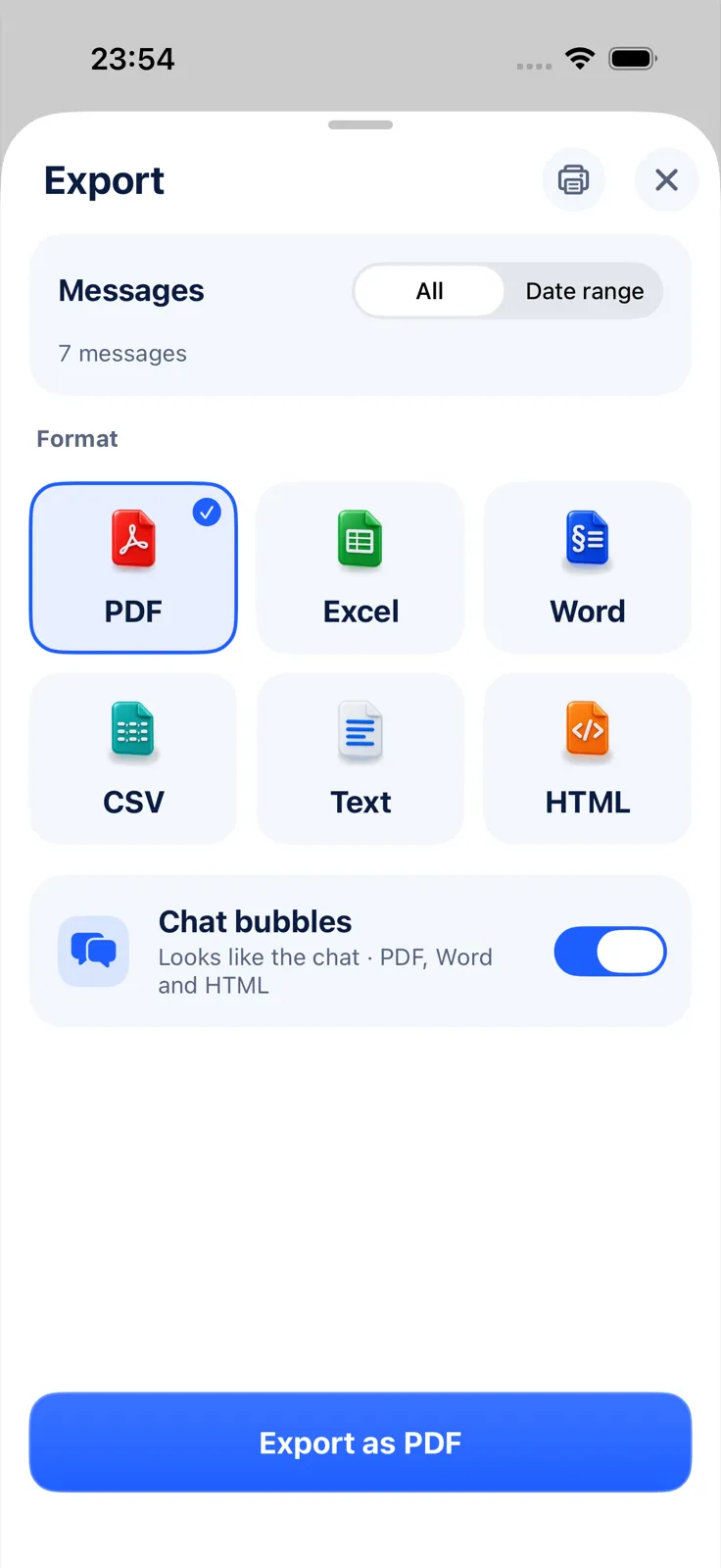
Photos from the chat are placed inside the PDF, Word and HTML files, so the recipient gets one attachment. Opening and previewing the chat are free; exporting and sharing need Exportly Pro, a weekly or yearly subscription with the price shown in the app before you buy. The chat is processed on your iPhone and never uploaded by the app.
The full walkthrough is in how to export a WhatsApp chat to PDF.
Which should you send?
| You send | The recipient gets | Good for |
|---|---|---|
| The ZIP from Export chat | A text file to unzip, plus loose media files | Someone who will process the text, or your own archive |
| A PDF | One document that looks like the chat | A landlord, HR, a client, a lawyer’s office |
| An Excel file | One row per message with date, time and sender | Someone who needs to sort or count messages |
| A few screenshots | Images of the screen | Two or three messages, nothing longer |
If the email is going to a lawyer or a court, ask which format they want before you send anything.
Questions people ask
Can I email an entire WhatsApp conversation?
Yes. Export chat exports the whole chat, and you can send it to any email address from the share sheet.
Why does the email only contain a ZIP or text file?
That is what WhatsApp’s export produces. To send a formatted document, convert the export to PDF first.
Can WhatsApp forward messages to my email automatically?
WhatsApp’s help page describes only the manual export, one chat at a time.
Will the other person know I emailed our chat?
WhatsApp documents no notification for exports. See does exporting a WhatsApp chat notify the other person.