
WhatsApp Export Chat Not Showing? Why and How to Fix It
If WhatsApp’s Export chat option isn’t showing, the verified reason is Restricted chat (formerly called Advanced chat privacy): while it’s on, people in that chat “can’t export the chat” (WhatsApp: About restricted chat). In a one-to-one chat either person can turn it off; in a group only admins can. Before that, make sure you’re looking in the right place, because the option sits in a different spot on iPhone and Android.
First, check where Export chat lives
The option isn’t in the chat’s main screen or in WhatsApp’s settings; it’s in the chat’s own menu.
- iPhone: open the chat, tap the contact’s name or the group name at the top, then Export chat.
- Android: open the chat, tap More options (three dots) > More > Export chat.
- WhatsApp Web: open the chat, click More options > Export chat.
Source: WhatsApp Help Center, How to export your chat history.
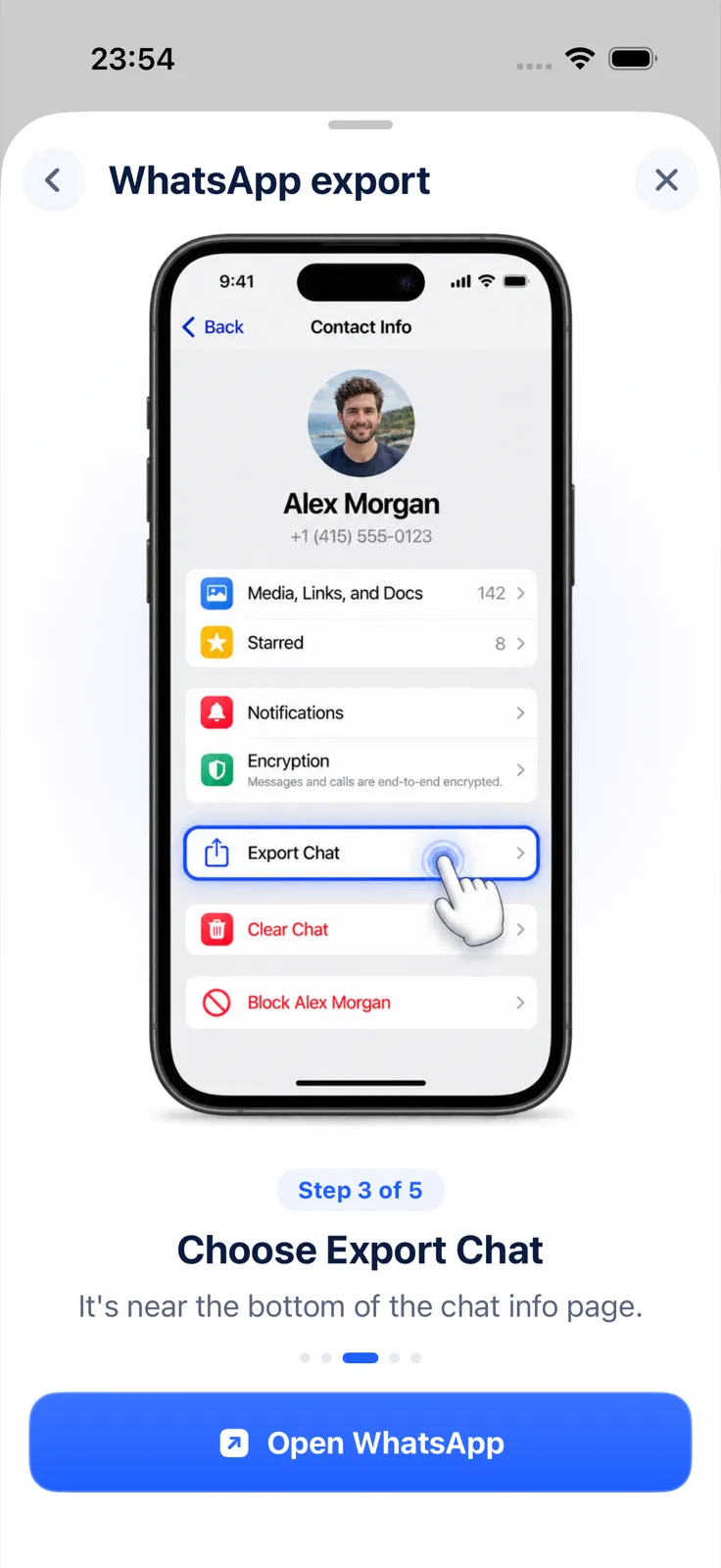
If you’ve looked there and it’s still missing for one particular chat while other chats have it, Restricted chat is the likely cause.
Is Restricted chat turned on?
Restricted chat is a per-chat privacy setting that, among other things, blocks exporting. WhatsApp describes it as the new, expanded replacement for Advanced chat privacy. When it’s on, people in the chat:
- can’t export the chat,
- don’t get media from the chat saved to their gallery automatically,
- can’t use Meta AI features in the chat,
- can’t use linked devices for the chat.
Who controls it matters. In an individual chat, either participant can turn it on or off. In a group, it’s set by group admins and “applies to every member of the group”. It can only be changed on your primary device and is only available on the latest version of WhatsApp (WhatsApp: About restricted chat).
How to turn off Restricted chat
If you’re allowed to change the setting, it takes a few taps on your primary phone.
In a one-to-one chat (either of you can do this):
- Open the chat.
- Tap the contact’s name.
- Tap Restricted chat and turn off Restricted chat.
In a group (admins only):
- Open the group.
- Tap the group name.
- Tap Restricted chat and turn off Restricted chat.
Source: WhatsApp: About restricted chat. Once it’s off, Export chat should be available again in the chat’s menu.
If the chat still uses the older Advanced chat privacy, WhatsApp says it doesn’t switch to Restricted chat automatically; on iPhone you tap the name, then Upgrade > Continue.
If you’re not an admin, or the other person turned it on
You can’t override someone else’s choice. If another person in a one-to-one chat turned on Restricted chat, or an admin did in a group, the honest route is to ask them. They may agree to turn it off while you export, for example so you can keep a record of an agreement.
Update WhatsApp and use your main phone
Restricted chat can only be changed on your primary device and only on the latest version of WhatsApp. If you can’t find the setting at all, update WhatsApp from the App Store and try again on the phone your account is registered on, not on a linked device.
WhatsApp’s help pages don’t list other reasons for a missing Export chat option, so we don’t speculate about them here.
Once the option is back
When Export chat is available again, the export is a ZIP file with the chat as text, plus media if you include it. Exportly, an iPhone app, opens that file and turns it into a PDF, Word, Excel, CSV, Text or HTML file. It can only work with what WhatsApp lets you export; while Restricted chat blocks the export, Exportly can’t get around it either. For the next steps, see how to export a WhatsApp chat to PDF or how to export a WhatsApp group chat.
Questions people ask
Why is there no Export chat option in WhatsApp?
Most likely Restricted chat (formerly Advanced chat privacy) is on for that chat. While it’s on, nobody in the chat can export it.
Who can turn off Restricted chat?
In a one-to-one chat, either person. In a group, only group admins. It has to be done on the primary device.
Does Restricted chat also stop photos from saving?
Yes. Media from that chat isn’t saved to the gallery automatically while it’s on.
Is there a size limit that hides the Export chat option?
WhatsApp’s help page doesn’t describe one. See the WhatsApp export chat limit for what WhatsApp does say.
Also available in: Deutsch · Español (México) · Français · Italiano · Português (Brasil) · Türkçe