
How to Export a Discord Chat
The only official way to export a Discord chat is the Data Package: request it under User Settings > Data & Privacy > Request your data. It can take up to 30 days and arrives as a ZIP of JSON files, and its messages folder contains only “the messages that you have sent”, not the other person’s replies (Discord Support). Third-party “Discord chat exporter” tools that run on your account count as self-bots, which Discord forbids.
How to request your Discord data on iPhone
You can start the request from the Discord app.
- Tap your avatar in the lower-right corner.
- Tap the cogwheel in the upper-right, then Data & Privacy.
- Under Request your data, tap Request all of my data and confirm.
On mobile you can only request all of your data. On the desktop app or in a browser, you can choose what to include: open User Settings (the cogwheel at the lower left), go to the Data & Privacy tab, select Request Data under Request your data, choose the data and select Request My Data (Discord Support).
Before you request, check three things: your account must be verified with an email address, you can only have one request at a time, and deleting or disabling your account cancels the request. Changing your email afterwards doesn’t redirect the download link.
What’s in the Discord Data Package
The package is a ZIP of JSON files, sent as a download link to your account email. The link stays active for 30 days (Discord Support).
The messages folder “contains all the messages that you have sent on Discord”, split into DMs, group messages and channels. Each message has an ID, a timestamp, the contents and any attachments (as a link).
What that means for a chat export:
- Only your side. The other person’s messages aren’t in it, so a DM reads as half a conversation.
- No deleted messages. Messages you deleted aren’t included.
- Not a document. JSON is data for software, not a page you can read or print.
The process “can take up to 30 days to complete” (Discord Support).
Are Discord chat exporter tools allowed?
Tools that log in as you and pull messages automatically put your account at risk. Discord’s rule on self-bots: “Automating normal user accounts (generally called “self-bots”) outside of the OAuth2/bot API is forbidden, and can result in an account termination if found” (Discord Support).
Discord’s Terms of Service also prohibit scraping its services without written consent “by using any robot, spider, crawler, scraper, or other automatic device, process, or software”, and its Developer Policy says not to “mine or scrape any data”. Whatever a tool’s website says, these are Discord’s rules, so we don’t recommend any of them.
Get a readable copy of a whole Discord DM
If you need both sides of a conversation as a document, capture what’s on your screen. Screenshots work for a few messages; for a longer DM, record your iPhone’s screen while you scroll. Discord’s help center doesn’t document screenshot notifications.
Exportly, an iPhone app, turns those captures into a document. It isn’t a bot, doesn’t log in to Discord and doesn’t use Discord’s API; it only reads a recording or screenshots you made yourself, on your iPhone.
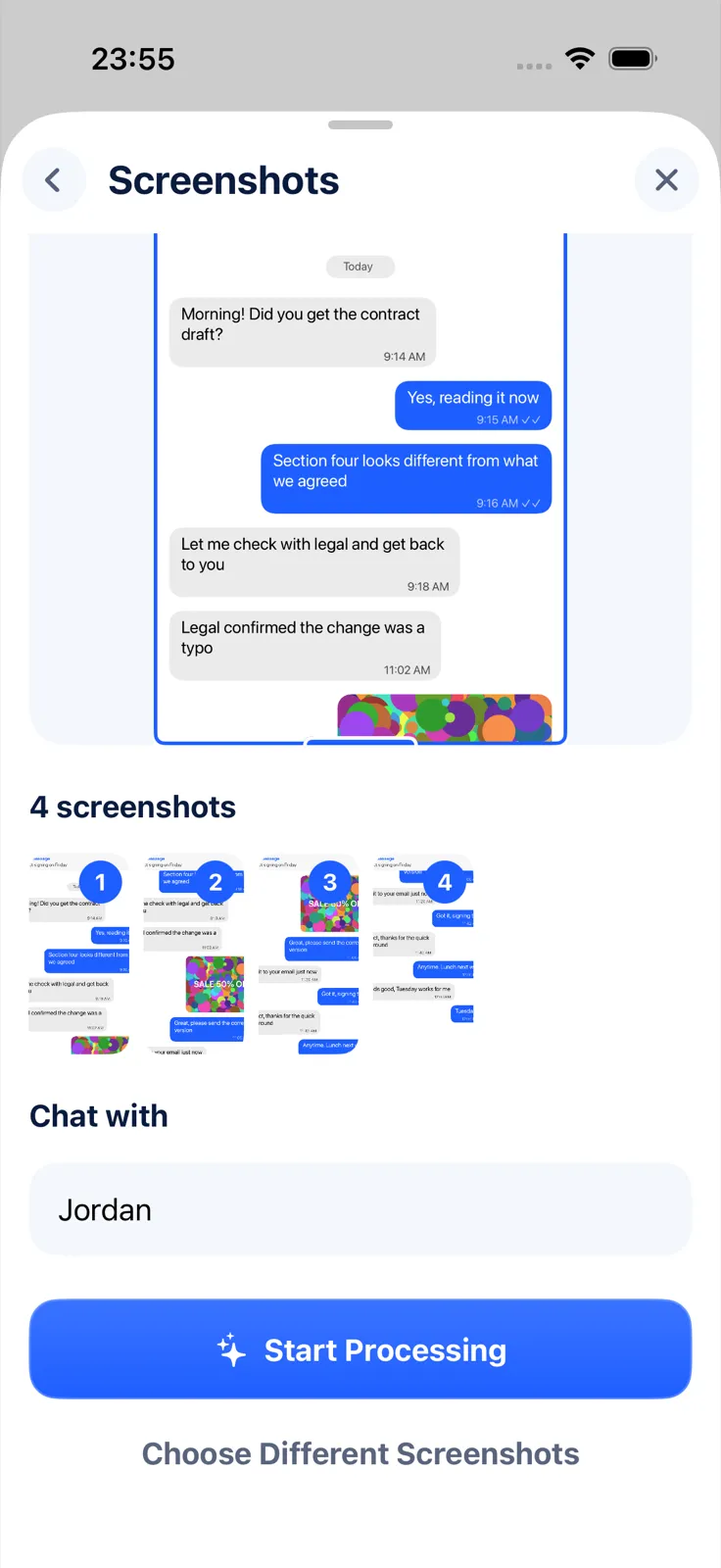
- In Exportly, add a chat and choose Discord.
- Choose Record & scroll, start the recording and scroll through the DM, or choose From screenshots and pick your screenshots in order.
- Optionally type the other person’s name under Chat with. Your own messages are labelled “You”.
- Check the preview, tap Export Chat and pick PDF, Word, Excel, CSV, Text or HTML. Excel puts each message on a row with Date, Time, Sender, Message and Attachment columns.
The limits: Exportly reads English and Turkish text only for now, and it captures what was on screen, so deleted messages won’t appear. Importing and previewing are free; exporting needs Exportly Pro (weekly or yearly, price shown in the app before you buy). The chat is processed on your iPhone and never uploaded.
For workplace chat, see how to export a Slack conversation. If you’re closing your Discord account, read how to save your messages before deleting an account first, since deleting cancels a pending data request. Other apps are compared in how to export a Telegram chat on iPhone.
Questions people ask
Can I export a Discord DM?
Partly. Discord’s Data Package includes the messages you sent in each DM, as JSON. It doesn’t include the other person’s messages. For both sides, record or screenshot the conversation.
How long does a Discord data request take?
Up to 30 days. After that, the download link stays active for 30 days.
Can I get banned for using a Discord chat exporter?
Discord says automating a normal user account (“self-bots”) is forbidden and can result in account termination, and its Terms ban scraping.
Can I request my Discord data on iPhone?
Yes: avatar > cogwheel > Data & Privacy > Request all of my data. On mobile you can only request everything.
Also available in: Deutsch · Español (México) · Français · Italiano · Português (Brasil) · Türkçe