
How to Download Your Instagram Messages
To download your Instagram messages, use Export your information in the Instagram app: Profile > Menu > Meta Account (or Accounts Center) > Your information and permissions > Export your information, then choose messages, a date range and a format. Meta says it may take up to 30 days to email you the link, and you then have 4 days to download the file (Instagram Help Center). This exports your account data, not one conversation as a readable document; for that, you record or screenshot the chat.
How to download Instagram messages on iPhone
The export runs from Instagram’s account settings, which Meta is gradually moving from Accounts Center to Meta Account. You may see either name.
- Tap Profile (or your profile picture) at the bottom right.
- Tap Menu at the top right.
- Tap Meta Account (or Accounts Center), then Your information and permissions.
- Tap Export your information > Create export.
- Select your Instagram profile, tap Next, then Export to device.
- Choose the information to include (messages are one of the types), the date range, the format, the email for the notification and the media quality.
- Tap Start export.
Source: Instagram Help Center, iPhone app. Picking only messages and a short date range keeps the file smaller than exporting everything.
How long it takes and what you get
Plan for a wait and a deadline.
- The wait: “It may take up to 30 days for us to email you an export link.”
- The deadline: once it’s ready, “you’ll have 4 days” to download it from Available downloads in the Export your information tool.
- Security: downloading is password-protected, so have your Instagram password ready.
- Space: you need enough free storage, and higher media quality means bigger files.
- Deleted messages: deleted information “will not appear when you access or download your information”.
Source: Instagram Help Center. Instagram’s page only says you can choose a “format”. Meta’s equivalent page for Facebook names the options as HTML, a ZIP with an “index” file you open in a browser, and JSON, which is meant for machines (Facebook Help Center).
Send it to another service instead
You can also export to an external service rather than your phone: follow the same path, choose Export to external service, pick the service, connect it, choose how often, enter your password and tap Start export (Instagram Help Center). This suits people who want regular copies in their cloud storage, not a one-off chat record.
Save one Instagram conversation as a readable file
Meta’s tool exports by type of information and date range, not one chat at a time, and the result is a set of files rather than something that looks like a conversation. If you need a single chat you can read, print or send, capture it from the screen.
Before you do, know Instagram’s rules on screenshots:
- Vanish mode: someone can take “a screenshot or screen recording of a message in vanish mode”, and “You’ll receive a notification if we detect they take a screenshot” (Instagram: vanish mode). In other words, screenshots there aren’t silent.
- Disappearing photos and videos: screenshots are disabled for a disappearing photo or video sent in a chat (Instagram Help Center).
- Normal chats: Instagram’s help pages don’t describe a screenshot notification.
Turn screenshots of an Instagram chat into a document with Exportly
Exportly, an iPhone app, reads screenshots or a screen recording of a chat and rebuilds it as a conversation you can export.
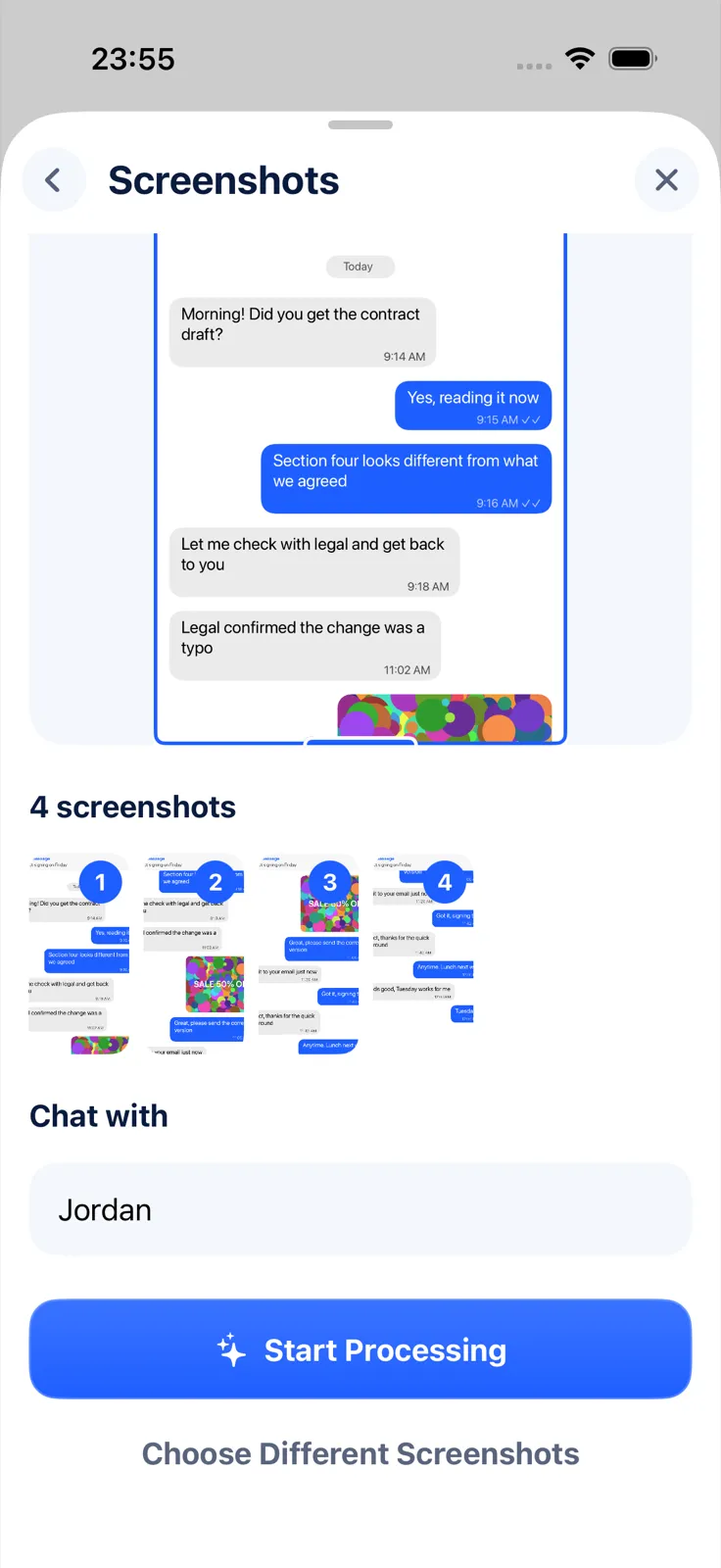
- Take screenshots of the Instagram chat in order, from the first message you need to the last. For a long chat, a screen recording while you scroll is easier.
- In Exportly, add a chat, choose Instagram, then From screenshots (or Record & scroll).
- Pick the screenshots. Optionally type a name under Chat with; it becomes the chat’s title and the other person’s label, and your messages show as “You”.
- Tap Start Processing. The text is read on your iPhone, and the chat is never uploaded.
- Tap Export Chat and choose PDF, Word, Excel, CSV, Text or HTML.
Limits to know: this reads English and Turkish text only for now, it only captures what was on screen, and in vanish mode taking screenshots can notify the other person. Importing and previewing are free; exporting, sharing and printing need Exportly Pro (weekly or yearly, price shown in the app before you buy).
For Facebook’s messaging app, see how to download your Messenger messages. If you’re about to close your account, read how to save your messages before deleting an account first. Other apps are covered in how to export a Telegram chat on iPhone.
Questions people ask
How long does it take to download Instagram messages?
Meta says it may take up to 30 days to email you the export link. After that, you have 4 days to download it.
Can I download just one Instagram conversation?
Not with Instagram’s tool, which exports by type of information and date range. For one readable chat, take screenshots or a screen recording and turn them into a document.
Does Instagram notify someone if I screenshot a chat?
In vanish mode, yes, if Instagram detects it. Screenshots of disappearing photos and videos are disabled. Instagram doesn’t document a notification for normal chats.
Where is “Download your information” now?
It’s called Export your information: Profile > Menu > Meta Account (or Accounts Center) > Your information and permissions > Export your information.
Also available in: Deutsch · Español (México) · Français · Italiano · Português (Brasil) · Türkçe