
How to Save Text Messages from a Loved One Who Died
To save text messages from a loved one who has died, first make sure the iPhone won’t delete them on its own: set Keep Messages to Forever. Then back up the phone and make a copy of the conversation outside the Messages app, such as a PDF you can keep, print or share with family. Only the first step is urgent; the rest can wait until you’re ready.
First, stop the messages from expiring
Your iPhone may be set to remove old conversations automatically. Apple says that with any option other than Forever, conversations, including attachments, are removed after the chosen period.
- Open Settings, then tap Apps, then Messages.
- Scroll down to Message History and tap Keep Messages.
- Choose Forever.
Source: Apple: Delete messages and attachments on iPhone.
This only stops automatic removal. It doesn’t protect a conversation that gets deleted by hand, and Apple notes that with Messages in iCloud turned on, deleting a conversation on one device deletes it on all of them. If several people in the family share devices or an Apple Account, it can help to agree that nobody deletes anything for now.
If something was deleted by accident
Deleted messages stay in Recently Deleted for up to 30 days. In Messages, open the menu above the conversation list, tap Recently Deleted, select the conversation, then tap Recover and Recover Messages (Apple: Recover deleted messages on iPhone). After 30 days they’re gone from there.
Back up the iPhone
A backup protects the whole phone, messages included, if it’s lost or damaged.
- iCloud Backup: Settings > your name > iCloud > iCloud Backup, turn on Back Up This iPhone, or tap Back Up Now (Apple: Back up iPhone). You can also back up to a Mac.
- Messages in iCloud keeps your conversations on all your Apple devices and uses iCloud storage (Apple: Set up Messages on iPhone).
A backup is there to restore the phone. To read, print or share the conversation, make a separate copy as well.
Make a copy you can keep, read and print
A file outside Messages doesn’t depend on a phone, a setting or an account. You can store it with family photos, send it to a sibling or print it.
- On a Mac: if the messages sync there, open the conversation, choose File > Print, and save it as a PDF (Apple’s macOS Sequoia guide).
- On the iPhone, a few messages: screenshots, saved to Photos.
- On the iPhone, the whole conversation: an app that exports it as a document.
Exportly does this on the iPhone that holds the messages:
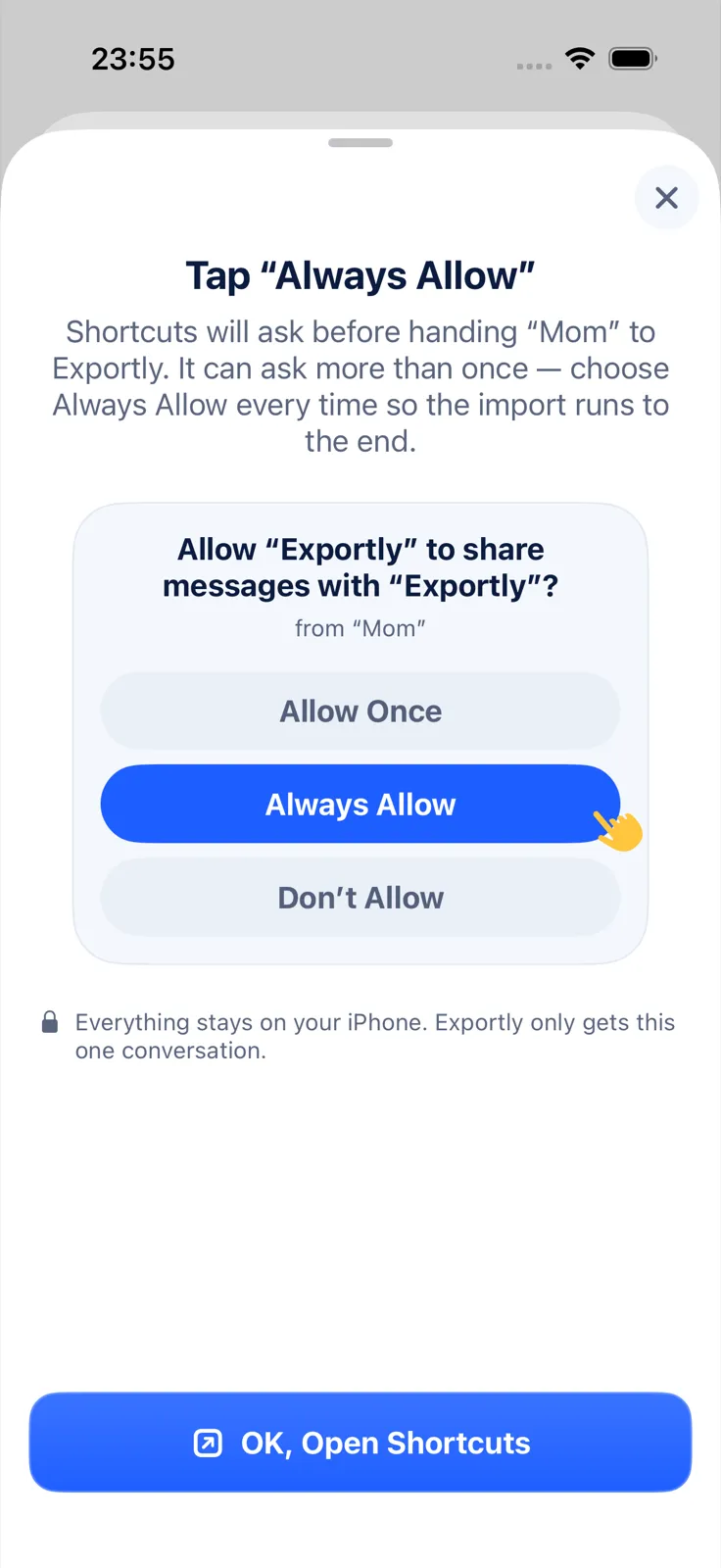
- Use the Exportly Shortcut (iOS 26 or later). Tap Find Conversations, choose the conversation, pick Everything (slowest) to bring in the full history, and tap Always Allow when Shortcuts asks. It may ask more than once. Text and photos come in.
- Read through the preview.
- Tap Export Chat, choose PDF with Chat bubbles on, so it looks the way it did on the phone, then save it to Files or print it.
For WhatsApp, use WhatsApp’s Export chat with With all media and share the file to Exportly instead. For another app, Record & scroll captures the conversation from the screen; it reads English and Turkish text only and brings in text without photos.
The shortcut imports text and photos, not voice messages or videos, so save those separately. Importing and previewing are free; exporting and printing need Exportly Pro, a weekly or yearly subscription with the price shown in the app before you buy. The conversation is processed on the iPhone and never uploaded. Exportly can’t recover deleted messages or reach anything stored in iCloud.
If the messages are only on their phone or account
Sometimes the messages you want are on your loved one’s iPhone, or only in their Apple Account. If you can open their iPhone, the steps above work there too.
If they named you as a Legacy Contact, Apple can give you access to data in their account, which includes Messages in iCloud, iCloud Photos, iCloud Drive files and anything in an iCloud Backup (Apple: What data can a Legacy Contact access). To request it, Apple asks for:
- the access key your loved one created when they chose you;
- their death certificate (requirements vary by country).
On an iPhone, go to Settings > your name > Sign-In & Security > Legacy Contact, tap their name and Request Access, then upload the death certificate. Apple’s Digital Legacy website works too. Once approved, you can view the data on iCloud.com, download it at privacy.apple.com, or restore it to a device from the iCloud Backup. Access lasts three years from approval, after which the account is permanently deleted, so download what you want to keep (Apple: How to request access as a Legacy Contact).
If you weren’t named as a Legacy Contact, Apple points to other options for a deceased family member’s account.
You can also add a Legacy Contact for yourself under Settings > your name > Sign-In & Security > Legacy Contact. It requires iOS 15.2 or later (Apple: How to add a Legacy Contact).
What to do with the conversation
Some people keep the PDF in a family folder. Others print it, or turn a year of messages into a bound keepsake; our guide on making a text message book walks through that. For the general settings that keep any conversation safe, see how to save text messages on iPhone, and for paper copies, how to print text messages from iPhone.
Questions people ask
How do I stop texts from disappearing on my iPhone?
Open Settings > Apps > Messages > Keep Messages and choose Forever. Then make a copy outside Messages, such as a backup and a PDF.
Can I get the messages from their Apple Account?
Only if they named you as a Legacy Contact, or through the other options Apple lists for family members. As a Legacy Contact, you need the access key and a death certificate, and access lasts three years.
Can I save their voice messages too?
Not with Exportly, which imports text and photos only. Keep the phone and its backup safe in the meantime.
Also available in: Deutsch · Español (México) · Français · Italiano · Português (Brasil) · Türkçe