
How to Make a Text Message Book
To make a text message book, export the conversation as a PDF that looks like the chat, then upload that PDF to a print-on-demand or photo-book service that prints from PDF files, and add a cover. Lulu and Blurb both say on their sites that they print books from uploaded PDFs. Check the service’s page size, margin and bleed requirements before you upload.
What a text message book takes
A book made from messages has three parts, and you prepare each one separately.
- The interior: the conversation as a PDF, page after page.
- The cover: a separate design or PDF, depending on the service.
- The print service: it checks your files, prints and binds the book.
The conversation is usually the hard part, because Messages and WhatsApp don’t save a conversation as a PDF on the iPhone by themselves.
Step 1: Turn the conversation into a PDF
Pick the route that matches where the messages are.
Messages on a Mac (free). If your messages sync to a Mac with Messages in iCloud, open the conversation and choose File > Print, then use the PDF menu to save a PDF (Apple: Print or create a PDF of a conversation, macOS Sequoia guide). Menus can differ on later macOS versions.
On your iPhone with Exportly. Exportly exports a conversation as a PDF with chat bubbles, your messages on the right and theirs on the left, with dates between the days.
- Bring the conversation in:
- Messages: use the Exportly Shortcut (iOS 26 or later). Choose Everything (slowest) for the whole history. Text and photos come in.
- WhatsApp: use WhatsApp’s Export chat, choose With all media so the photos come along, and share the file to Exportly.
- Another app: Record & scroll, which reads English and Turkish text only and brings in text without photos.
- Read through the preview.
- Tap Export Chat. Under Messages, choose All, or Date range with From and To to make a book of one year, one trip or one relationship milestone.
- Under Format, choose PDF and leave Chat bubbles on.
- Tap Export as PDF and save the file to Files.
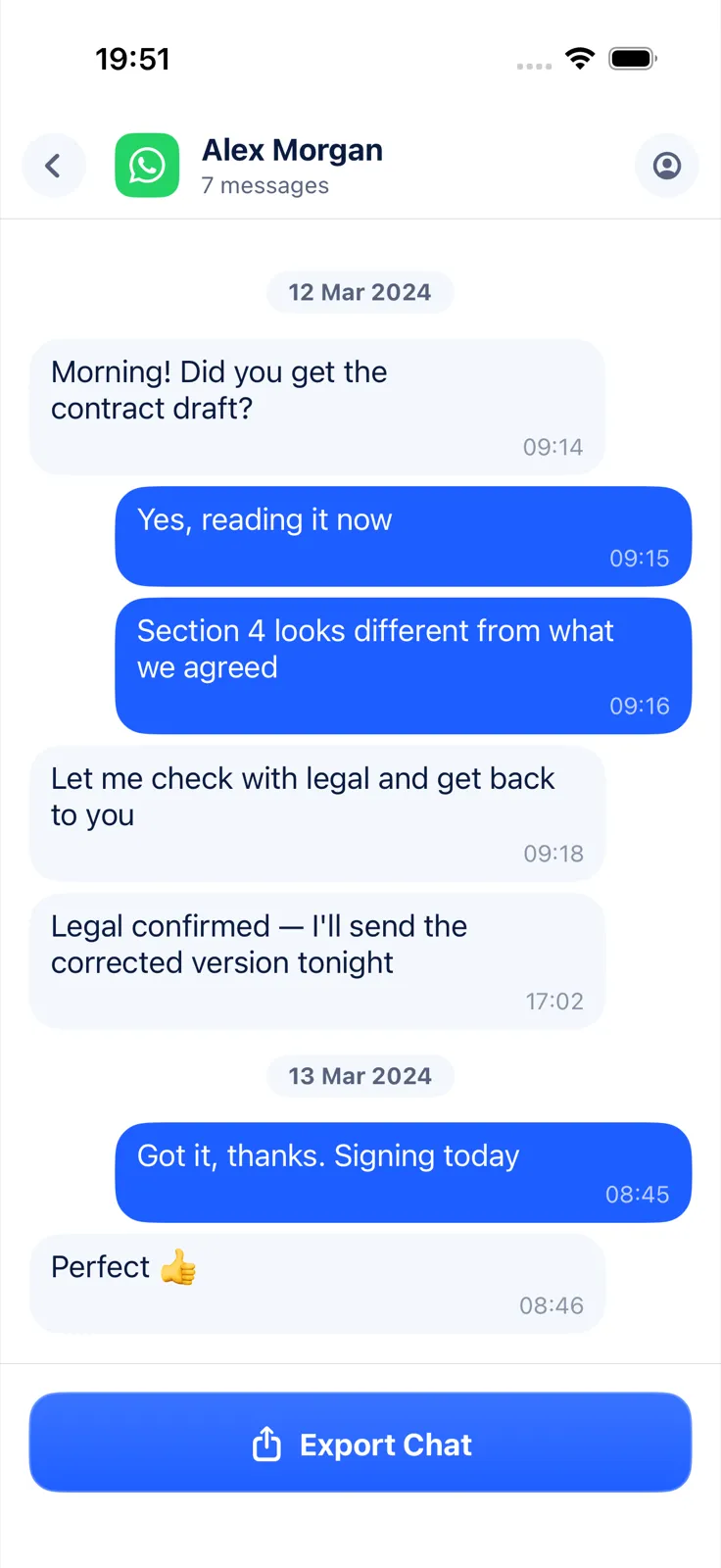
What the PDF looks like, so you can match it to a book:
- A4 pages with 48-point margins and no bleed.
- Page 1 starts with the chat title and the date range.
- Every page has a “Page X of Y” footer.
- The time sits in the corner of each bubble.
- Photos from the import appear inside the bubbles.
Importing and previewing are free; exporting needs Exportly Pro, a weekly or yearly subscription with the price shown in the app before you buy. The conversation is processed on your iPhone and never uploaded. Exportly makes the PDF only: it has no cover designer and no print service.
Step 2: Choose a service that prints from a PDF
We have no partnership with either service; these are two that document PDF printing.
Lulu. Lulu says that to make a book you first create two PDFs: your interior and your cover. You choose a trim size and binding, upload a print-ready interior PDF, and build the cover from a template that gives the overall page size including bleed, margins and spine width (Lulu: Create). Its sizes run “from large Letter and A4 to the smallest pocket-sized books”, with hardcover, paperback, coil-bound and saddle-stitch options (Lulu: Products).
Blurb. Blurb has a “PDF to Book” workflow for turning a PDF file into a book or magazine, with a PDF uploader (Blurb: PDF to Book, Blurb: Bookmaking tools). Blurb recommends checking your PDF in Adobe Acrobat Reader before uploading.
Prices, page-count limits and shipping times vary by size and binding, so check them on each site.
Step 3: Match the PDF to the book
Most problems show up here, before you pay for anything.
- Page size. Exportly’s PDF is A4. Lulu lists A4 among its sizes. If you want a different trim size, check the service’s requirements for the interior file first.
- Bleed. The PDF has white margins and no bleed. Read the service’s interior requirements to see whether that works for the book you’ve chosen.
- Page numbers. The PDF already carries “Page X of Y” in the footer. Keep that in mind if the service adds its own.
- Cover. Make it separately with the service’s template or tools.
- Proof. If the service offers a single proof copy, order one before printing several.
Ideas for the book
- One book per year. Use Date range to export January to December, then repeat next year.
- A family group chat. Export the WhatsApp group with media for the photos everyone shared.
- A gift for a couple. The conversation from the first message to the wedding, with dates on every page.
- In memory of someone. Our guide on saving text messages from a loved one who died covers keeping the messages safe first.
For the PDF itself, see how to save text messages as a PDF on iPhone, how to export a WhatsApp chat with media and how to export text messages from a specific date range.
Questions people ask
How do I turn text messages into a book?
Export the conversation as a PDF, then upload it to a service that prints from PDF files, such as Lulu or Blurb, and add a cover.
Can I include the photos we sent each other?
Yes, if they’re in the export: use Exportly’s Messages shortcut, which imports photos, or a WhatsApp export made With all media, and export to PDF.
Can I include voice messages or videos?
No. A printed book holds text and images, and Exportly’s exports embed photos only.
Also available in: Deutsch · Español (México) · Français · Italiano · Português (Brasil) · Türkçe