
How to Save Chats on Snapchat
To save chats on Snapchat, tap a message in the chat: it gets a gray background, and everyone in the chat can see it’s been saved (Snapchat Support). To keep a whole conversation from disappearing, set Delete Chats… to Never in that chat’s settings. To get a copy outside the app, My Data lets you download a ZIP that includes your saved chat history.
How to save a message in a Snapchat chat
Saving works message by message.
- Open the chat.
- Tap the message you want to keep. It turns gray to show it’s saved.
- To unsave it, tap it again.
Snapchat’s own wording: “Saved messages have a gray background, so everyone in the Chat can see what’s saved!” (Snapchat Support). Saving is not private: the other person sees which messages you kept.
Stop Snapchat chats from deleting automatically
By default, Snapchat deletes chats “24 hours after everyone in the conversation has viewed the Chat … or 31 days after the Chat was sent, whichever is sooner” (Snapchat Support). You can change that per conversation.
- Swipe right from the Camera screen to the Chat screen.
- Press and hold the friend’s or group’s name, then tap Chat and Notification Settings.
- Tap Delete Chats… and choose Never. The other choices are After Viewing, 24 Hours After Viewing and 7 Days After Viewing.
Anyone in the conversation can change this setting, and everyone sees a status message when it changes. Messages already sent keep the setting they were sent with, so switching to Never protects new messages, not ones that are already set to disappear. Saving, replying to or reacting to a message also keeps it longer.
Download your saved Snapchat chats with My Data
My Data gives you a ZIP file of your account data, and one of the categories is “Saved Chat History”.
- Log in at accounts.snapchat.com, or in the app go to Settings and select My Data.
- Select the data to include and choose a date range (or turn the date range off to get everything).
- Confirm your email address and tap Submit.
- When the email arrives, or under your recent exports, select See exports > Download.
Source: Snapchat Support. Snapchat says it strives “to deliver data within 7 days, but large downloads can take longer”, and a request can’t be canceled once submitted. If the download fails on your phone, Snapchat suggests trying from a computer.
What My Data doesn’t include: chats that were never saved and have already been deleted. And if you and the other person are no longer friends, saved messages in that one-on-one chat “may be removed from our systems over time” and may no longer be available to download.
Does Snapchat notify when you screenshot a chat?
Yes. Snapchat’s list of chat icons includes “A screenshot has been taken of your Chat” (Snapchat Support), so the other person will see that you took a screenshot. Snapchat’s help center doesn’t say either way whether screen recordings trigger a notification, so don’t assume a recording goes unnoticed.
Snapchat also reminds users that people “can always potentially save” messages “by taking a screenshot or by using some other image-capture technology” (Snapchat Support).
A readable copy of a Snapchat conversation with Exportly
Saved messages stay inside Snapchat, and My Data arrives as account files. If you need the conversation as a document you can read, print or send, Exportly, an iPhone app, can build one from a screen recording or screenshots.
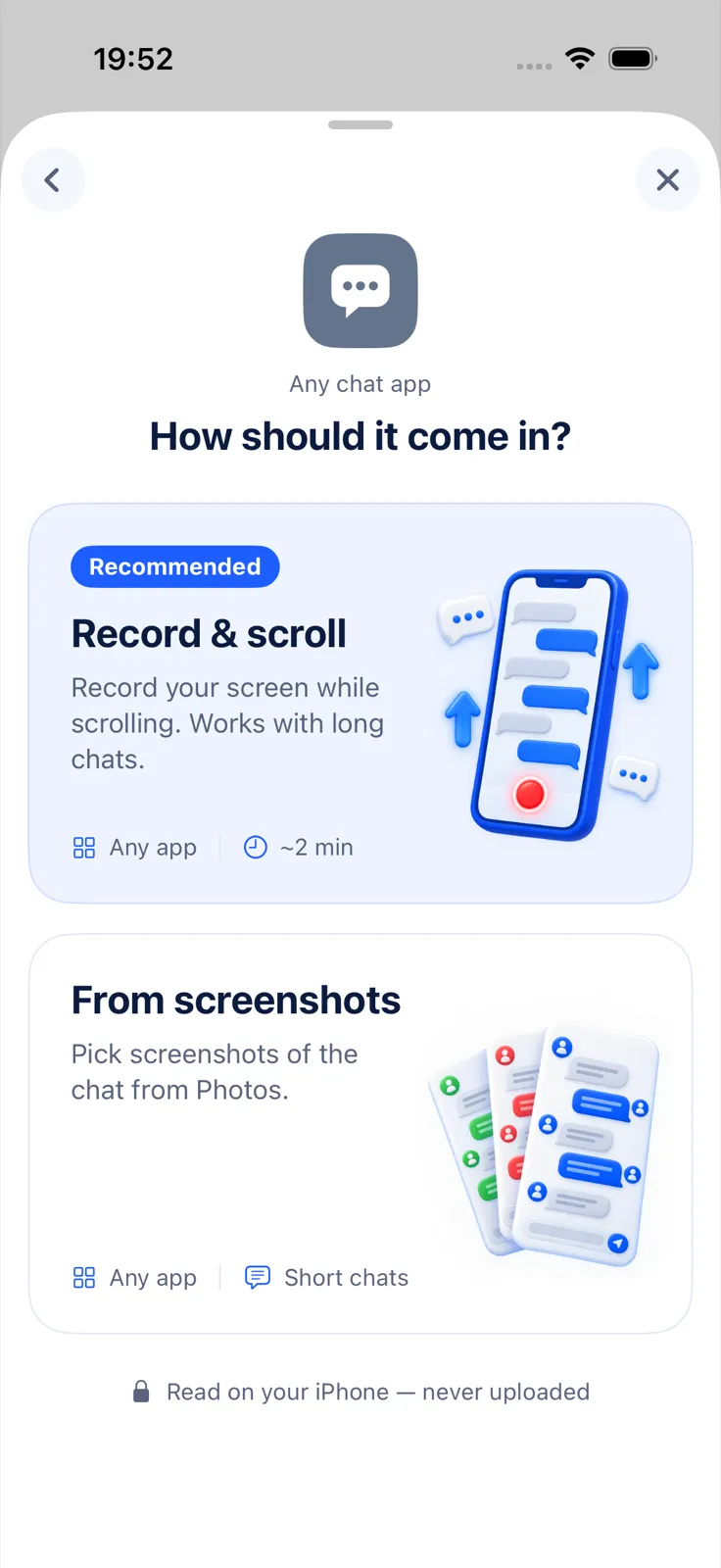
- In Exportly, add a chat and choose Snapchat.
- Choose Record & scroll and scroll through the conversation while recording, or From screenshots and pick the screenshots.
- Optionally type the other person’s name as the contact name. Your messages are labelled “You”.
- Tap Export Chat and choose PDF, Word, Excel, CSV, Text or HTML.
Be clear about what this means on Snapchat: screenshots show the other person a screenshot icon, and Snapchat doesn’t document how it handles screen recordings. Exportly only reads what was still on screen; it can’t bring back chats Snapchat already deleted. It reads English and Turkish text only for now. Importing and previewing are free; exporting needs Exportly Pro (weekly or yearly, price shown in the app before you buy). Everything is processed on your iPhone and the chat is never uploaded.
If you plan to delete your Snapchat account, see how to save your messages before deleting an account. For Instagram DMs, see how to download your Instagram messages. Other apps are compared in how to export a Telegram chat on iPhone.
Questions people ask
How do I save a whole Snapchat chat?
Set Delete Chats… to Never in that chat’s Chat and Notification Settings, and tap individual messages to save them. Messages sent before the change keep their old setting.
Can the other person see that I saved a message?
Yes. Saved messages get a gray background that everyone in the chat can see.
Can I download my Snapchat chats?
Yes, through My Data, which includes your saved chat history in a ZIP file. Snapchat aims to deliver it within 7 days.
Why did my saved Snapchat messages disappear?
If you’re no longer friends with the other person, saved messages in your one-on-one chat may be removed over time.
Also available in: Deutsch · Español (México) · Français · Italiano · Português (Brasil) · Türkçe