
How to Export a Microsoft Teams Chat
How you export a Microsoft Teams chat depends on the account. With Teams for personal use, Microsoft’s Export page lets you export Teams chat history, media and your call log as a download. With a work or school account, Microsoft documents export only as tools your organization runs, so you either ask your IT team or save the one chat you need from your own screen.
Which kind of Teams account do you have?
The export route is set by the account type, not by the device you use.
| Account | Official export | Who runs it | What you get |
|---|---|---|---|
| Teams for personal use (a Microsoft account) | The Teams Export page | You | A .tar file with a messages.json file, plus media and call log |
| Work or school | Teams Export APIs, Microsoft Purview eDiscovery | Your organization | Whatever your admin or compliance team produces |
| Either, one chat only | Screenshots or a screen recording | You | Images, or a document made from them |
If you sign in with an address from your employer or school, you are on a work or school account and the first route won’t work for you.
How to export chat history from Teams for personal use
Microsoft’s Export page sends your personal Teams data as a download you collect when it’s ready.
- Sign in to the Teams Export page with your Microsoft account.
- Choose to download your Chat history, Media, or both, then select Submit request. Select Continue when asked. Your call log is exported too.
- Come back to the Export page later. The status shows at the top under Available Exports, where a download link appears when the files are ready.
- Select Download.
Source: Microsoft Support: Export or delete your data in Microsoft Teams (free). Microsoft notes that these steps apply to Teams for personal use only, and that if you’ve been removed from a community, you can’t export that community’s data.
To download everything tied to your Microsoft account instead, go to the Microsoft account Privacy page, choose Sign in with Microsoft, open the Download your data tab and select Create new archive (same Microsoft page).
How to open the Teams export file
The personal export is data, not a document you can hand to someone. Microsoft’s instructions:
- The messages and files come in a .tar file, which may need an extra app to open. On Windows 10, Microsoft gives the command
tar -xvf YOURFILENAME_export.tar. - Inside you’ll find messages.json.
- To read it, Microsoft suggests its viewer: open
index.htmlin theskype-parserfolder, browse to messages.json and click Load.
That’s fine for keeping a complete copy. If what you need is one conversation that a manager, client or lawyer can read, you’ll still have to turn it into a PDF or document yourself.
Can you export a Teams chat from a work or school account?
Not with a button Microsoft documents for users. Microsoft’s export routes for organizations are admin tools:
- Teams Export APIs in Microsoft Graph can export one-to-one chats, group chats, meeting chats and channel messages. The app that calls them has to be registered and authorized by a user or administrator. Messages deleted by users can be reached up to 21 days after deletion (Microsoft Learn: Export content with the Teams Export APIs).
- Microsoft Purview eDiscovery is used to preserve, collect, review and export Teams content. For compliance, chat messages are stored in the Exchange Online mailboxes of everyone in the chat, and files shared in a chat sit in the sharer’s OneDrive (Microsoft Learn: Search for Teams content).
In practice, ask your IT or compliance team. Tell them which chat, which dates and why you need it. Your company’s policy also decides whether you may keep your own copy of work chats at all, so check it before you save anything from the screen. Our guide to keeping records of work conversations covers that habit in more detail.
Save one Teams chat as a PDF on your iPhone
When you need one chat you can see in the Teams app, and your policy allows it, the free option is screenshots: open the chat, take a screenshot, scroll, repeat. That leaves you with a stack of images.
To get one document instead, Exportly can read the chat from a screen recording. Teams is on its list of chat apps.
- In Exportly, add a chat, choose Teams, then Record & scroll.
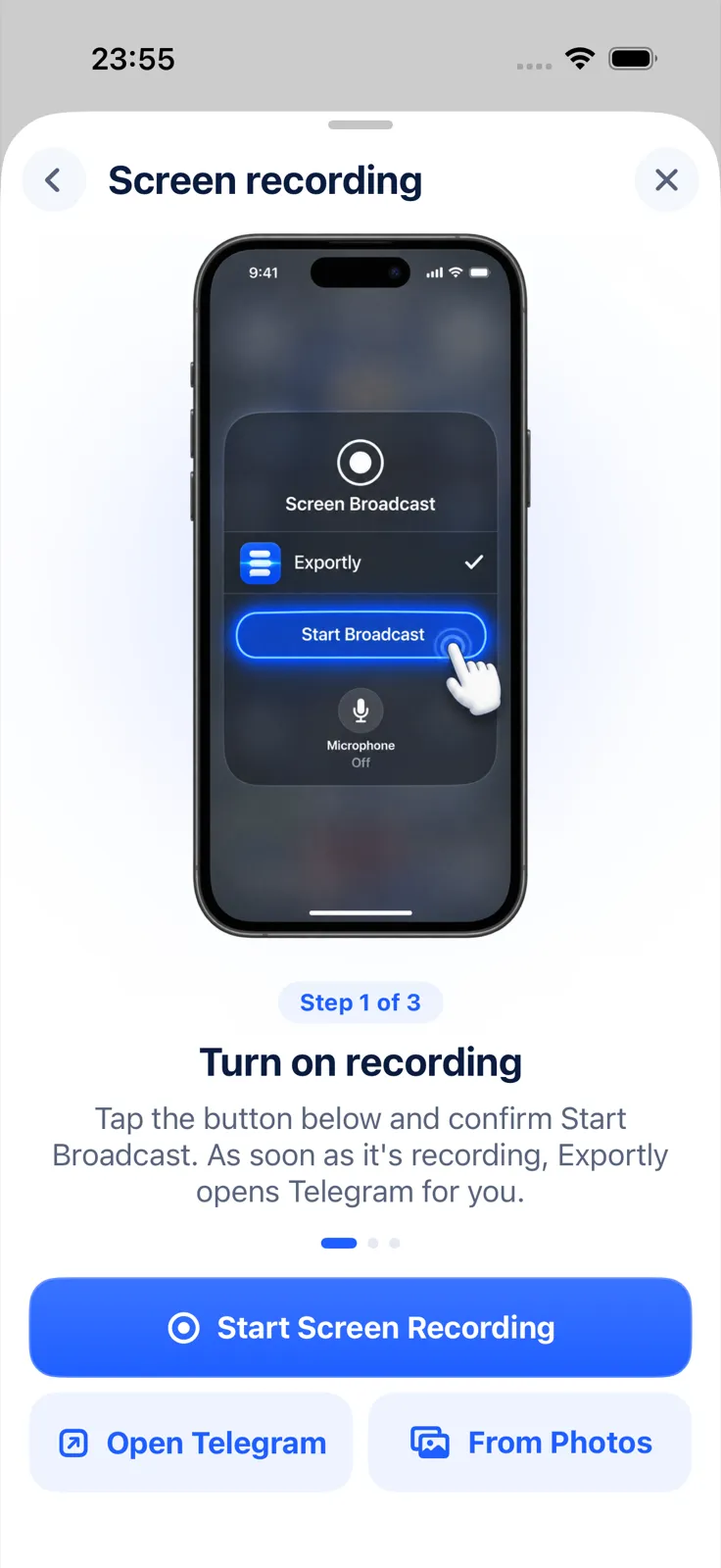
- Tap Start Screen Recording and confirm Start Broadcast. Exportly opens Teams for you.
- Open the chat, start at the oldest message you need and scroll down slowly to the newest. Then come back to Exportly.
- Type the other person’s name in Chat with, and Exportly reads the messages on your iPhone.
- Check the preview, then export as PDF (chat bubbles or plain text), Excel, Word, CSV, Text or HTML. Share the file or save it to Files.
Know the limits before you rely on it. Record & scroll reads English and Turkish text only, it brings in text but not photos or files, and it captures only what was on screen while you scrolled. Text recognition can misread a word, so read the preview before exporting. Importing and previewing are free; exporting, sharing and printing need Exportly Pro, a weekly or yearly subscription with the price shown in the app before you buy. Your chats are processed on your iPhone and never uploaded.
Not sure which file to pick? See PDF vs Excel vs Word for chat exports. The same recording method works for other apps without an export button, as covered in our Telegram export guide and the Slack conversation guide.
Questions people ask
Can I export a Teams chat to PDF?
Microsoft doesn’t document a PDF export. Personal accounts get a .tar file with messages.json, and work accounts rely on admin tools. For a PDF of one chat, capture it from the screen and turn it into a document.
How long does the personal Teams export take?
Microsoft doesn’t give a time. Check the Available Exports section of the Export page until the download link appears.
Can my admin export my Teams chats?
Microsoft documents the Teams Export APIs and Purview eDiscovery for organizations. Both cover one-to-one and group chats, and the APIs also cover meeting chats and channel messages.
Can I get deleted Teams messages back?
Through the Teams Export APIs, which your organization runs, messages deleted by users can be reached for up to 21 days. Exportly can’t recover deleted messages.
Also available in: Deutsch · Español (México) · Français · Italiano · Português (Brasil) · Türkçe