
How to Export a Viber Chat
Viber’s help center doesn’t document any way to export a Viber chat as a readable file. Its two official tools do something else: Viber Backup saves your history to iCloud (or Google Drive on Android) so you can restore it into Viber, and Request your data sends a file that, by Viber’s own account, contains no chat content. To get a Viber conversation as a PDF or text file, you have to capture it from the screen.
What Viber’s official tools do and don’t do
Here’s what each built-in option gives you.
| Tool | What it saves | Can you read it outside Viber? | Moves between iPhone and Android? |
|---|---|---|---|
| Viber Backup | Your chat history, optionally photos and videos | No, it restores into Viber | No |
| Request your data | Account data as a ZIP of JSON files | Yes, but it has no chat content | Not applicable |
| Screenshots or a screen recording | What you see on screen | Yes | Yes, they’re ordinary files |
How to back up Viber chats on iPhone
A backup is still worth having, because it protects your history if you lose or replace the phone.
- On your iPhone, open Settings, tap your name at the top, tap iCloud and make sure Viber is switched on.
- In Viber, tap More > Settings > Account > Viber Backup.
- Tap Back Up, or choose Auto backup (Daily, Weekly or Monthly). Choose whether to include Photos & Videos.
On Android, the same menu path leads to Google Drive instead of iCloud.
Source: Viber Help: Back up and restore your chat history.
Viber’s restrictions on backups:
- Backups have to be made on your phone, not on desktop or tablet unless that’s your primary device.
- History can’t be transferred between platforms, such as Android to iPhone.
- A restore needs the same phone number and the same iCloud or Google Drive account.
- Restoring returns your chat list to the last backup. Messages received between that backup and the restore aren’t saved.
Does “Request your data” include your messages?
No. Viber says your one-to-one and group chats are end-to-end encrypted and not saved on its servers, so your chat content “cannot be presented in your data file” (Viber Help: Control your personal data).
If you want the account data anyway: More > Settings > Privacy > Personal data > Request your data > Continue > Confirm. Within 14 days, a ZIP file of JSON data arrives as a message from Viber on your phone.
Before you deactivate Viber or clear history
Viber is blunt about this. Deactivating your account “will permanently remove your chat history and purchases”, and on Android, Clear message history deletes all your Viber messages permanently (Viber Help: Rakuten Viber settings). Save any conversation you want to keep first. Our checklist on saving messages before deleting an account walks through the order of steps.
How to save a Viber conversation as a PDF on iPhone
Because Viber has no export, your own copy has to come from the screen. Screenshots work for a few messages. For a longer conversation, Exportly turns a screen recording into one document. Viber isn’t one of the named apps in Exportly, so pick Other, which works with any chat app.
- In Exportly, add a chat, choose Other, then Record & scroll.
- Tap Start Screen Recording and confirm Start Broadcast. A red indicator shows it’s recording.
- Switch to Viber, open the chat, start at the oldest message you need and scroll down slowly.
- Come back to Exportly, type the other person’s name in Chat with and check the preview.
- Export as PDF (chat bubbles or plain text), Word, Excel, CSV, Text or HTML, and share it or save it to Files.
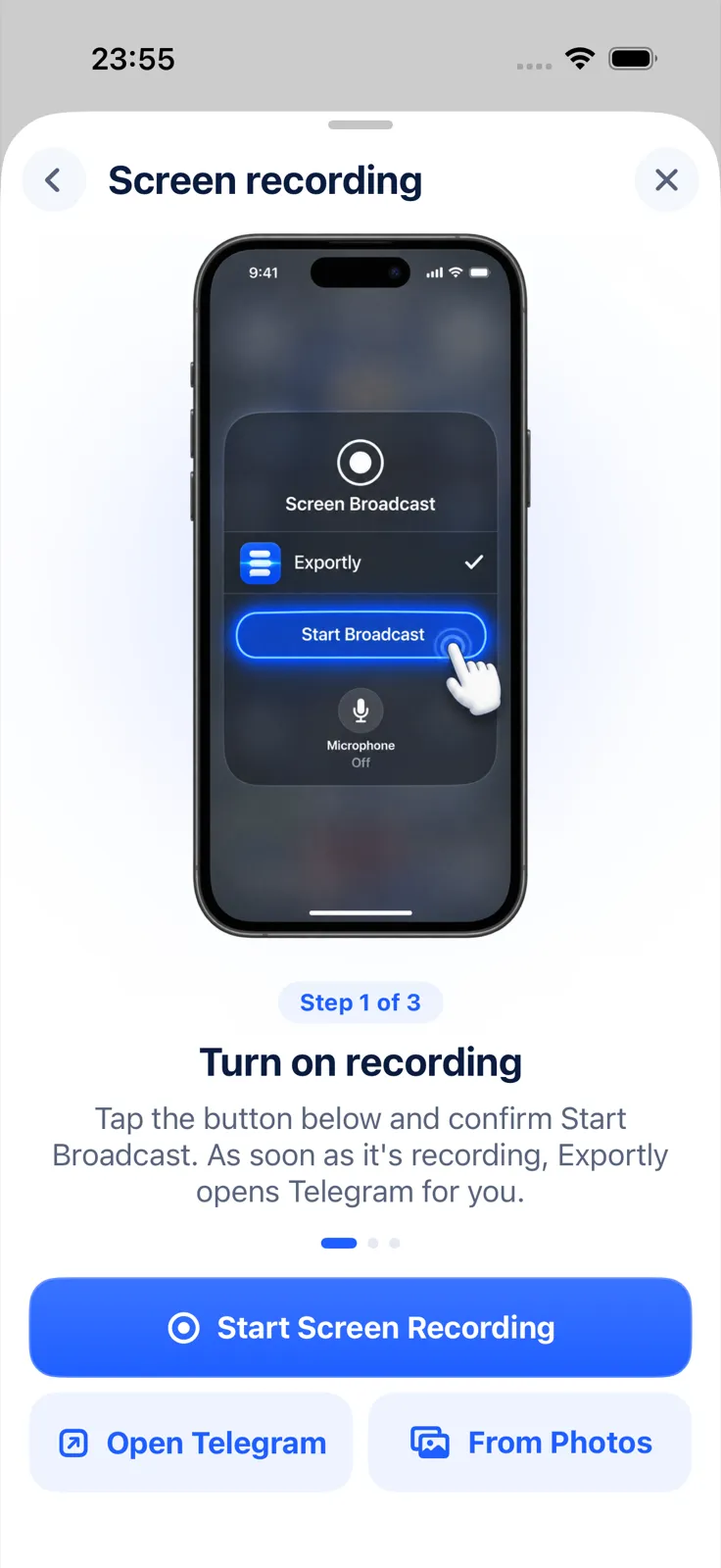
Limits: Exportly reads English and Turkish text only, brings in text but not photos, voice messages or videos, and reads only what was on screen. Check the preview, since text recognition can misread a word. Importing and previewing are free; exporting, sharing and printing need Exportly Pro (weekly or yearly, price shown in the app before you buy). The chat is processed on your iPhone and never uploaded. Exportly doesn’t back up or restore Viber and can’t open a Viber backup.
Signal and WeChat have similar gaps between backup and export; see how to export Signal messages and how to export WeChat chat history. The Telegram export guide compares the options across apps.
Questions people ask
Can I export a Viber chat to PDF or text?
Not from inside Viber. Its help center documents backups that only restore into Viber. To get a PDF or text file, capture the chat from your screen and convert it.
Can I move Viber chats from Android to iPhone?
Viber says chat history can’t be transferred between different platforms.
Can I read a Viber backup on my computer?
Viber doesn’t describe any way to open a backup outside the Viber app. It’s meant for restoring on the same phone number.
Also available in: Deutsch · Español (México) · Français · Italiano · Português (Brasil) · Türkçe